
On this page
A HighLevel customer in Colombia can approve a payment from the Nequi app when the merchant's Wompi account and transaction are eligible. Genius Checkout connects the HighLevel order to that hosted Wompi journey and sends the verified result back to the originating location.
Last reviewed: September 25, 2026.
Design for a buyer moving between apps
The buyer enters the Colombian phone number registered with Nequi. A push notification arrives in the Nequi app, where the buyer reviews and approves or rejects the amount. On a phone, this means leaving the browser and returning after the decision.
Keep the Genius Checkout session open during that switch. If the buyer presses Back, show a clear resume screen and a cancel option instead of sending the browser into a redirect loop.
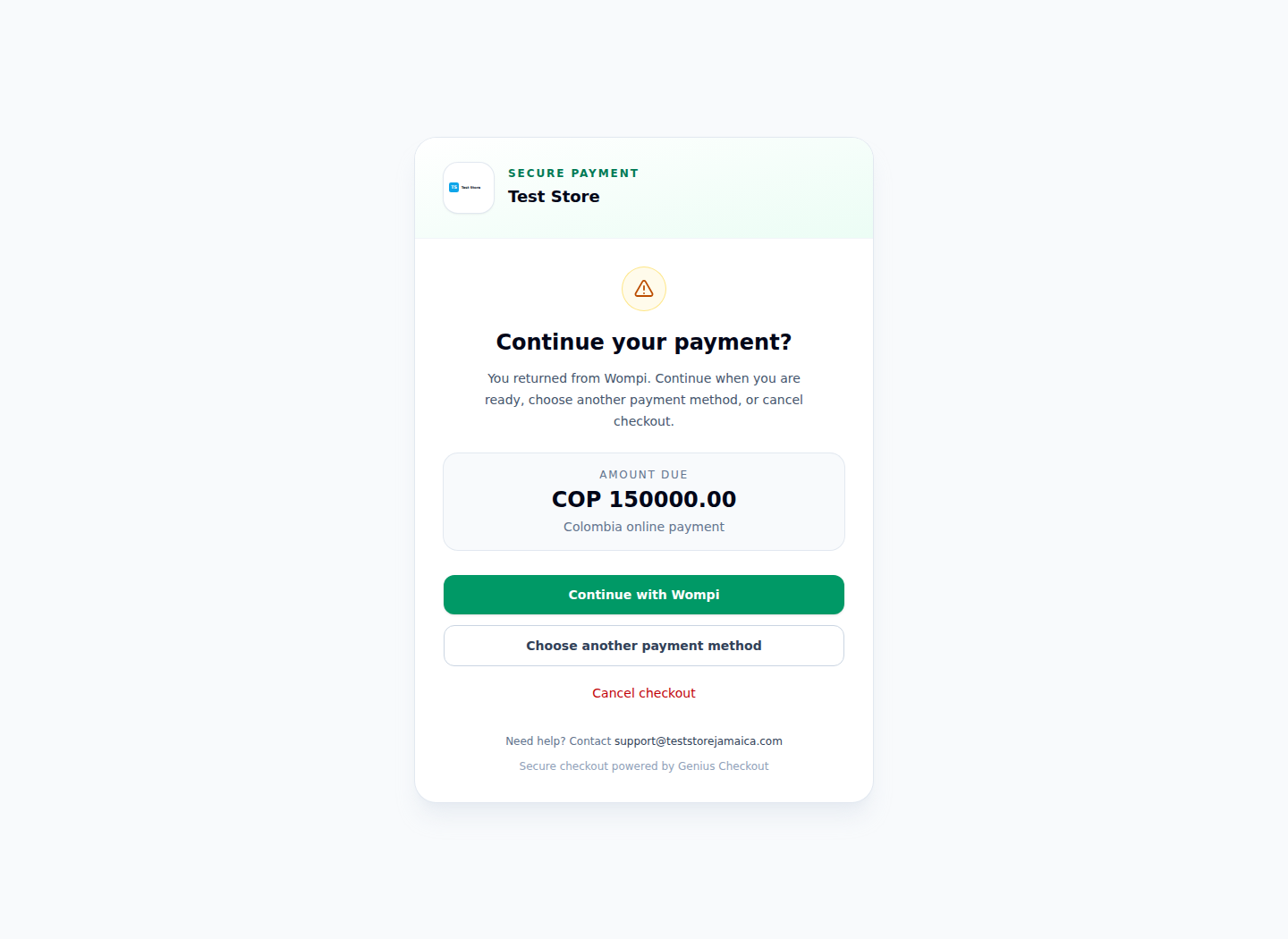
This real Wompi-only Test Store screen lets the buyer resume or cancel without exposing an unrelated gateway.
Connect the HighLevel location
Configure the Wompi Colombia credentials in Genius Checkout first. Then install Genius Checkout in the HighLevel App Marketplace, authorize the correct merchant, and assign it to a controlled COP product.
HighLevel can pass supported buyer details into Genius Checkout. Wompi handles the Nequi interaction. Genius Checkout does not receive the buyer's Nequi password or turn a wallet approval into a stored card.
Use provider status as the authority
The buyer can close the browser after approving in Nequi. Confirm payment with Wompi's authenticated event and status response, not with the fact that a return page loaded. Keep pending, approved, rejected, error, and cancelled states distinct in the HighLevel order history.
Treat each retry as a new attempt
A rejected Nequi request is complete as a failed attempt. If the buyer tries again, Genius Checkout creates a new session and Wompi transaction while retaining the HighLevel order reference for support and reconciliation. This prevents duplicate provider identifiers and preserves an honest timeline.
Test the mobile edge cases
Run the journey on Android and iOS where possible. Test approval, rejection, no response, an expired request, browser Back, app switching, delayed callback, and retry. Confirm the buyer sees a useful message and the HighLevel order reaches the same final status recorded in Genius Checkout.
Only display the Nequi logo after the option appears in the merchant's controlled Wompi checkout. Wompi decides account and transaction eligibility.
Sources and next step
- Wompi Colombia payment methods
- Wompi Nequi payer guidance
- Genius Checkout HighLevel integration
- Genius Checkout Wompi overview
Book a Nequi connection review before adding the method to a live HighLevel sales page.