
On this page
The Genius Checkout WooCommerce plugin connects a supported Mastercard Payment Gateway Services account to a WordPress store. Merchants can use MPGS Direct or Hosted Checkout when the selected mode, credentials, and currency match the account issued by their bank or payment provider.
This guide reflects the integration reviewed on September 4, 2026.
| Requirement | Value |
|---|---|
| Store | Supported WordPress and WooCommerce installation |
| Gateway | MPGS Direct or MPGS Hosted Checkout |
| Credentials | Merchant ID, gateway URL, and mode-specific authentication |
| Subscription support | Requires tokenization and recurring-payment permission |
| Settlement | Controlled by the merchant bank or acquiring agreement |
Identify the gateway mode
MPGS Direct and Hosted Checkout have different credential and browser flows. Use the gateway URL and merchant ID supplied for the account. Create or obtain API authentication according to the bank's merchant-portal instructions.
A Sagicor merchant may receive MPGS access, but the bank name alone does not determine every configuration field. Use “your bank, for example Sagicor” in instructions and match the actual onboarding pack.
Configure MPGS in Genius Checkout
- Open the Genius Checkout merchant assigned to the store.
- Select MPGS Direct or MPGS Hosted Checkout.
- Choose test mode.
- Enter the merchant ID, authentication, and gateway URL for the same environment.
- Select a currency enabled for the MPGS account.
- For Hosted Checkout, add the merchant logo through the media library. Start from a square 1000 by 1000 pixel image.
- Save and resolve every validation response.
Connect WooCommerce
- Install the current Genius Checkout for WooCommerce plugin.
- Open the Genius Checkout payment-method settings.
- Enter the API credentials for the configured merchant.
- Authorize the store domain.
- Confirm the merchant name and test mode in the connection status.
- Select the supported buyer-facing payment methods.
The store domain allowlist protects the API connection. It should not require DNS verification for this plugin redirect use case.
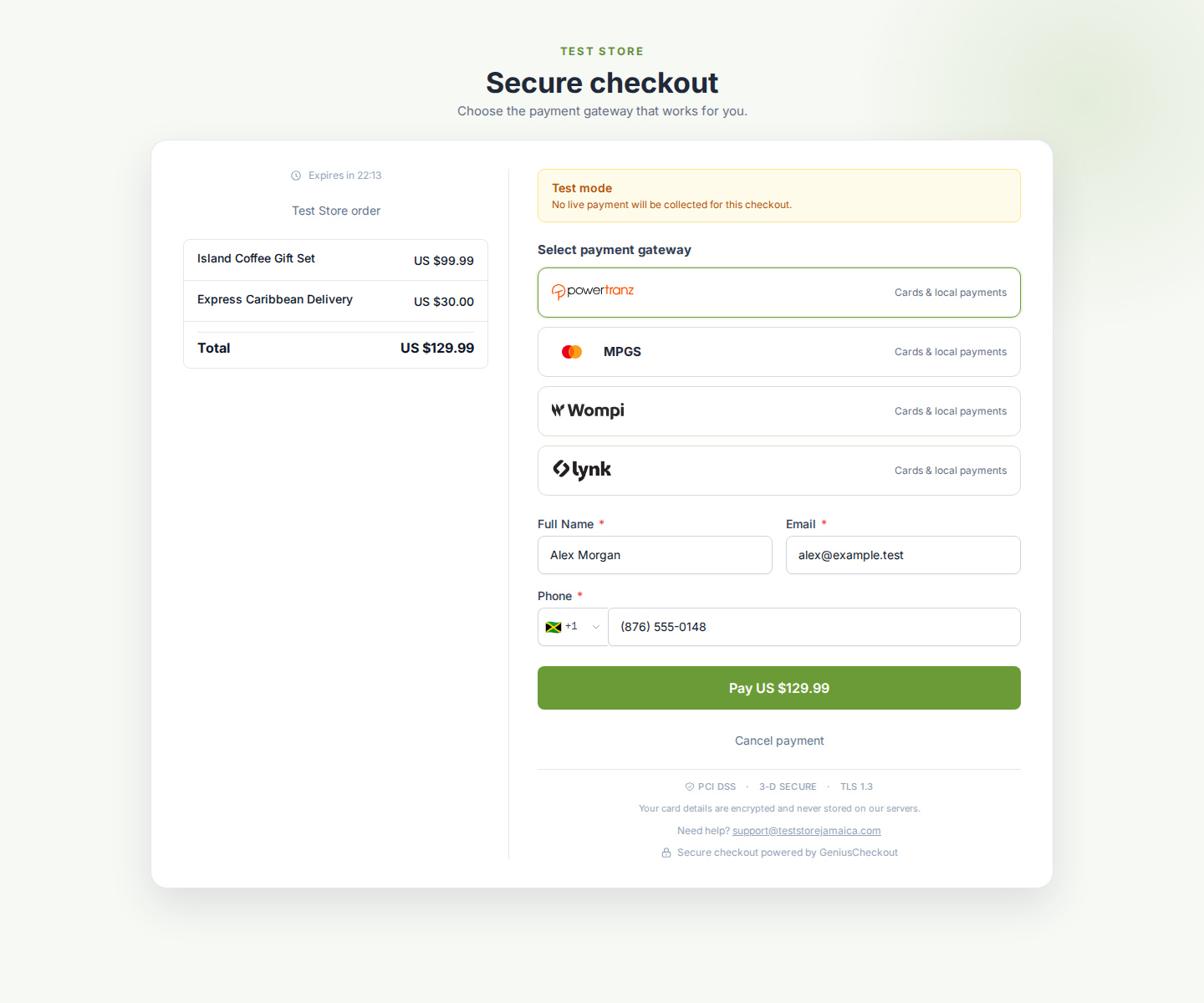 A merchant with multiple active gateways can present MPGS as its own buyer choice. The actual options depend on the merchant's live configuration and order currency.
The current plugin supports WordPress 6.0 or newer, WooCommerce 8.0 or newer, PHP 8.0 or newer, WooCommerce High-Performance Order Storage, and both classic and Blocks checkout. Review the current WordPress.org requirements before changing a production site.
Understand Hosted Checkout navigation
MPGS Hosted Checkout runs on a provider page. That page may block iframe display. WooCommerce already starts a top-level redirect, so it does not need the embedded HighLevel handoff screen.
The buyer must be able to cancel, use browser Back, and return to the store without being forced back to MPGS. A cancellation should keep the WooCommerce order available for another attempt.
Run the test matrix
Test each configured mode and environment independently:
- Successful one-time payment.
- Declined payment with a useful error.
- Buyer cancellation.
- Browser Back from MPGS Hosted Checkout.
- Duplicate callback delivery.
- Saved-card payment when enabled.
- Subscription renewal and failed-renewal retry when enabled.
- Refund or void from a WooCommerce order.
Record the order ID, Genius Checkout transaction, receipt number, MPGS reference, UTC timestamp, mode, and result. Never record raw card data.
Recurring payments
A one-time MPGS payment can succeed even when the merchant account lacks tokenization. WooCommerce Subscriptions requires a reusable payment token and a Genius Checkout plan with recurring capability.
For a zero-value trial, verify that WooCommerce can establish the subscription payment method without trying to charge an unsupported zero amount. Test the first paid renewal after the trial. A manual retry must create a new Genius Checkout transaction.
Refunds and payment state
WooCommerce may request a refund from the order screen, but the gateway operation depends on the transaction state. Genius Checkout should void an uncaptured authorization when MPGS supports the void and refund a captured payment when MPGS supports the refund.
The transaction timeline should record the original payment and each later capture, void, or refund event.
Common MPGS errors
HTTP 502 during start. Check the upstream response, gateway host, mode, currency, and credentials. Genius Checkout should create an operational log even if no financial transaction exists.
Authentication failure. Confirm the merchant ID and API authentication belong to the gateway URL and environment.
Hosted Checkout does not open. Confirm the account has Hosted Checkout permission and that the browser is not trying to render the provider page inside an iframe.
Renewal rejected. Check tokenization, recurring permissions, plan capability, token ownership, and the safe API error returned to WooCommerce.
Use MPGS beyond WooCommerce
An approved MPGS merchant configuration can connect through Genius Checkout to HighLevel, Ecwid, GiveWP, payment links and QR codes, and supported custom API integrations. Test each connection because hosted navigation, callbacks, and order-state handling differ by source platform.