

On this page
- Which Jamaican banks connect merchants to Powertranz?
- Start with the business use case, not the credential form
- Choose Powertranz Direct or HPP
- Configure Powertranz in Genius Checkout
- Connect Powertranz to the way the business sells
- A Jamaica launch test that is worth doing
- Move to production safely
- Common Powertranz integration problems
- Frequently asked questions
- Official references and next step
To integrate Powertranz in Jamaica, obtain an eCommerce merchant facility through a bank or acquirer that supports Powertranz, confirm whether the account uses Powertranz Direct or the Hosted Payment Page (HPP), configure the matching test credentials in Genius Checkout, connect the website or business platform, complete lifecycle testing, and then activate the separate live configuration.
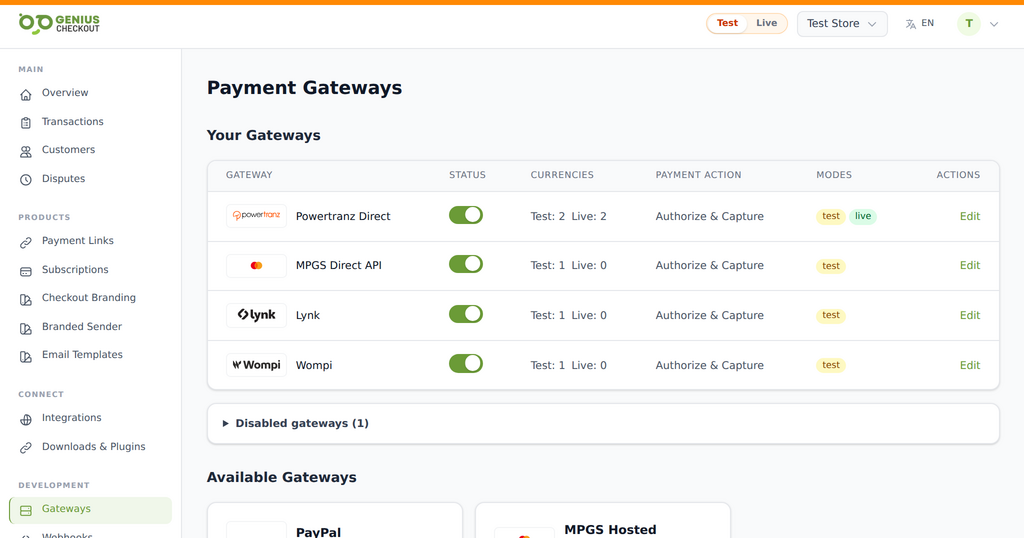 Genius Checkout keeps each approved gateway as a distinct route. The merchant activates only the services and environments provisioned for its own account.
Powertranz was formerly known as First Atlantic Commerce or FAC. Older bank forms, credential emails, and portal labels may still use the FAC name, but they can refer to the same gateway family. Powertranz announced the brand change in May 2025.
This guide was reviewed on September 25, 2026.
Which Jamaican banks connect merchants to Powertranz?
The Powertranz merchant locations map currently lists these institutions for Jamaica:
- National Commercial Bank Jamaica, shown as JNCB.
- First Global Bank.
- CIBC Caribbean.
- Scotiabank Jamaica.
Treat this as a provider directory, not an approval guarantee. Products, eligibility, currencies, onboarding routes, and new-account availability can change. Ask the institution specifically for its online card payment, eCommerce acquiring, or Powertranz/FAC merchant facility.
Confirm the processor on the approved product before entering any credential. A bank can offer more than one payment service, and credentials for another gateway are not interchangeable with Powertranz credentials.
NCB's eCommerce page is one public example: NCB describes a hosted payment page powered by Powertranz, formerly FAC. Another bank may supply Direct processing, HPP, or a different commercial package. Genius Checkout does not replace the acquiring agreement. It provides the software layer that connects an approved merchant facility to the business's selling tools.
Start with the business use case, not the credential form
The bank will assess what the business sells, how buyers receive it, expected transaction values, refund exposure, currencies, and fraud controls. Prepare a clear operating description before applying.
For example:
- A hotel may need room deposits, balances, cancellations, and USD as well as JMD.
- A membership business may need reusable payment tokens and merchant-initiated renewals.
- A retailer may need immediate capture, partial refunds, and order fulfilment evidence.
- A consultant may only need payment links for invoices and deposits.
- An event organizer may need QR-linked checkout and a reliable refund process.
Ask the bank or onboarding team to confirm:
- Test and live Merchant IDs.
- Test and live processing passwords.
- Enabled currencies and settlement accounts.
- Direct, HPP, or both.
- 3-D Secure requirements.
SALEor immediate capture capability.AUTHORIZE, laterCAPTURE, void, refund, and partial refund capabilities.- Tokenization and recurring-payment permission.
- For HPP, the exact PageSet and PageName.
- Whether the portal profile is labelled FAC or Powertranz.
The portal login password is not necessarily the payment-processing password. Do not reuse one because the labels look similar.
Choose Powertranz Direct or HPP
The best mode depends on the approved account and the buyer experience the business needs.
| Decision | Powertranz Direct | Powertranz Hosted Payment Page |
|---|---|---|
| Card-entry experience | Presented through the Genius Checkout payment flow | Buyer continues to a secure Powertranz-hosted page |
| Provider settings | Merchant ID and processing password, plus approved behavior | Merchant ID, processing password, PageSet, PageName, and correct portal profile |
| Subscriptions through Genius Checkout | Available only when Powertranz enables tokenization and recurring use | Not currently supported through the Genius Checkout HPP module |
| Branding | Controlled primarily in Genius Checkout | Hosted-page appearance also depends on the profile configured with Powertranz or the bank |
| Typical reason to choose | Saved cards, supported subscriptions, or a more integrated checkout | Provider-hosted card entry and reduced card-form responsibility on the merchant site |
Powertranz describes its Hosted Payment Page as a redirect to a secure provider page. That distinction matters for platforms that use iframes: the initial integration may be embedded, but the external hosted page often needs to open at the top browser level.
Configure Powertranz in Genius Checkout
Use test mode first.
- Sign in to the Genius Checkout merchant account that will receive the transactions.
- Open Gateways.
- Choose Powertranz Direct or Powertranz HPP according to the onboarding pack.
- Enter the test Merchant ID and test processing password.
- For HPP, enter PageSet and PageName exactly as issued and select the matching FAC or Powertranz portal type.
- Enable only currencies approved for that merchant account.
- For Direct, select Authorize & Capture for immediate charging or Authorize Only when the merchant has a defined later-capture process.
- Enable 3-D Secure, address verification, or tokenization only when they are supported by the account and required for the use case.
- Save and resolve every validation response.
- Run the connection test and then create a controlled payment.
Genius Checkout uses the Powertranz staging endpoint for test mode and the live gateway endpoint for production. Keep the Merchant ID, password, currency, environment, and website API key aligned. A common start failure occurs when one live value is mixed into an otherwise test configuration.
The Powertranz configuration guide explains every field and its expected source.
Connect Powertranz to the way the business sells
After the gateway works, choose the channel that solves the business problem:
- Use payment links and QR codes for invoices, deposits, WhatsApp sales, or in-person prompts.
- Connect WooCommerce for a WordPress store.
- Connect HighLevel for funnels, CRM workflows, agencies, and memberships.
- Connect Ecwid or GiveWP when those tools fit the selling model.
- Use the Genius Checkout API for an approved custom application.
WordPress merchants can follow the separate Powertranz and WooCommerce guide. HighLevel users can follow the Powertranz and HighLevel guide. Those pages focus on platform-specific setup while this article owns the broader Jamaica onboarding question.
A Jamaica launch test that is worth doing
Do not stop after seeing one approval screen. Test the path from the buyer's first click to the merchant's reconciliation record.
Buyer and order data
- The business name, support contact, amount, and currency are correct.
- Buyer name, email, phone, and supplied billing address remain accurate.
- Each attempt creates a unique Genius Checkout transaction and gateway order reference.
- A retry does not try to rewrite a failed financial transaction.
Payment states
- Approved card payment.
- Safe decline with a useful message.
- 3-D Secure challenge and return.
- Buyer cancellation and browser Back.
- HPP top-level redirect where applicable.
- Duplicate callback delivery without duplicate charging.
- Authorize, capture, void, full refund, and partial refund where approved.
Recurring use
- Save a payment method only after customer consent.
- Verify the returned token belongs to the correct merchant and customer.
- Test a zero-value trial setup if the website sells trials.
- Trigger the first paid renewal.
- Trigger a failed renewal and a manual retry.
- Confirm that every retry uses a new gateway order identifier.
Use provider-approved test cards in test mode. For final live validation, use a controlled low-value transaction owned by the test team. Do not place a test order against a real customer's email or order.
Move to production safely
- Confirm that the bank or Powertranz has activated the live merchant profile.
- Enter the live Merchant ID, live processing password, and live HPP fields in the live Genius Checkout view.
- Verify the live currencies and payment action.
- Authorize the production website domain where required.
- Run a low-value live payment.
- Compare the website order, Genius Checkout transaction, Powertranz record, receipt, and expected settlement details.
- Test the applicable void or refund operation.
- Record who will monitor declines, disputes, refunds, and reconciliation after launch.
Test and live credentials should remain separate even when the visible Merchant ID looks similar.
Common Powertranz integration problems
“No payment gateway is configured”
The website API key may belong to a different Genius Checkout merchant or environment. Confirm the merchant name shown by the integration before changing the gateway settings.
“Duplicate order ID not allowed”
Every payment attempt, renewal, and retry needs a new gateway-facing identifier. Keep the website order number as searchable metadata, but do not reuse it as the unique financial attempt ID.
HPP opens no payment window
The browser may be blocking a popup or the flow may be incorrectly treating a normal top-level checkout as an iframe. A standard website redirect should go directly to the hosted page. An embedded platform needs a deliberate top-level handoff.
A one-time payment works but a renewal fails
Confirm tokenization, Card-on-File, recurring-payment permission, plan capability, and the validity of the stored token. HPP success does not prove that Direct tokenization is enabled.
Buyer details contain values the customer did not enter
Do not invent a street address to satisfy an optional field. Send only buyer data supplied by the buyer or source platform, normalize unsupported characters conservatively, and log what was transmitted without storing prohibited card data.
Frequently asked questions
Is FAC the same as Powertranz?
Powertranz is the current brand of the gateway previously known as First Atlantic Commerce. Older integrations and bank material may still use FAC labels.
Do I apply to Genius Checkout or to a bank?
Apply to a supporting bank or acquirer for the merchant facility. Genius Checkout connects the approved Powertranz account to supported websites, software, payment links, and APIs.
Can I settle to a Jamaican bank account?
Settlement is governed by the bank or acquiring agreement. Confirm account type, currencies, fees, reserves, and timing with the institution before launch.
Does Powertranz work only with WooCommerce?
No. The same approved gateway can be exposed through several Genius Checkout integrations and payment channels. Each source platform still needs its own return-flow, webhook, retry, and order-state testing.
Official references and next step
- Powertranz merchant locations and participating institutions
- Powertranz payment gateway
- Powertranz Hosted Payment Page
- NCB eCommerce
- Genius Checkout Powertranz overview
- Genius Checkout Powertranz configuration guide
Create a Genius Checkout account or book a setup review with the bank's onboarding pack available.