

On this page
A Saba business can accept card payments before a guest arrives by obtaining an approved eCommerce merchant facility, confirming that it supplies Powertranz/FAC credentials, and connecting that facility through Genius Checkout. Powertranz's current map shows RBC Royal Bank for Saba.
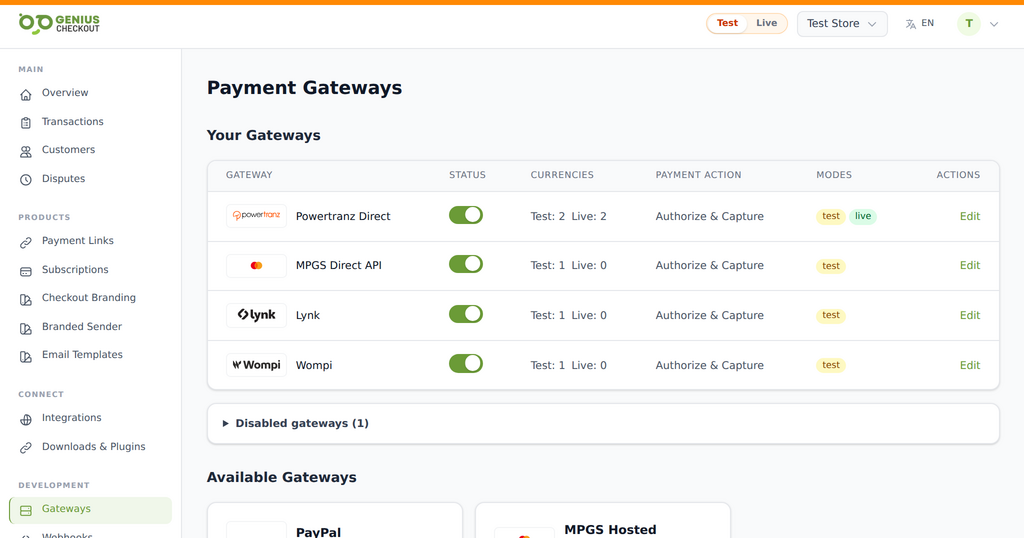 Genius Checkout keeps each approved gateway as a distinct route. The merchant activates only the services and environments provisioned for its own account.
For a small lodging property, dive operator, guide, or professional service, a focused payment flow often works better than a large online store. The merchant can send a payment link tied to a reservation, add checkout to a compact website, or connect a booking workflow without changing the bank relationship.
Reviewed on September 25, 2026.
Confirm the RBC route before building
Ask RBC's merchant-services team whether the approved Saba profile is provisioned on First Atlantic Commerce/Powertranz and whether it uses Direct or the Hosted Payment Page. The bank should also confirm the Merchant ID, test access, live access, 3-D Secure settings, refunds, settlement account, and any tokenization rights.
RBC's Caribbean eCommerce page identifies FAC as an eCommerce provider, but the merchant's own approval determines what is usable. An ordinary business account or card terminal is not the same as an online merchant facility.
Choose the smallest sales system that does the job well
Saba merchants may not need a catalogue with hundreds of products. Match the tool to the transaction:
| Need | Practical Genius Checkout route |
|---|---|
| Take a dive-trip deposit after confirming availability | Named payment link sent by email or WhatsApp |
| Sell fixed tours or merchandise | WooCommerce or Ecwid catalogue |
| Collect consultation or service fees | HighLevel funnel, appointment flow, or payment link |
| Connect an existing reservation database | Supported custom API integration |
| Present a counter or printed payment option | QR code leading to a secure payment page |
These channels can share the approved gateway, while retaining their own order references and customer records.
Direct and HPP solve different problems
Use Powertranz Direct only when that mode is approved and the business benefits from the integrated Genius Checkout flow. Saved cards or repeat charges also require tokenization and explicit customer consent.
Use HPP when RBC has enabled the hosted profile and issued PageSet and PageName. The buyer leaves the merchant page for secure card entry and returns afterward. The return page should be treated as navigation, not proof of payment; the server must verify the gateway status.
Configure test mode first
Enter the test Merchant ID and processing password in the matching Powertranz module. Add HPP fields exactly when applicable. Enable only the transaction currency confirmed for the account. Run a connection check, then a real test-mode payment.
Keep test and live values separate. When moving live, repeat the setup with live credentials and use one controlled low-value transaction to confirm the website, Genius Checkout record, Powertranz reference, receipt, and bank settlement path.
Test the awkward moments
Small teams feel payment problems immediately, so test the cases that create support calls:
- A guest closes the hosted page.
- A card is declined.
- The guest uses browser Back.
- The internet drops after the gateway approves.
- The same callback arrives twice.
- Staff send a replacement payment link after a failed attempt.
- A captured deposit must be refunded.
A retry must create a new payment transaction. It should not erase or modify the failed attempt. Staff should be able to tell a guest what happened without seeing or recording sensitive card data.
USD does not eliminate configuration work
Saba uses the US dollar, but the bank must still confirm that USD is enabled on the merchant profile and identify the settlement account and timing. The receipt should state USD, not only $, so an international guest sees an unambiguous amount.
Frequently asked questions
Do I need a shopping cart to use Powertranz?
No. A payment link or custom payment request may be better for confirmed reservations. A cart is useful when customers can choose and buy without staff intervention.
Can I take a balance later using the same card?
Only when RBC enables tokenization or the buyer completes a new secure payment. Do not store card numbers in a reservation system or message thread.
What should appear in the payment description?
Use a recognizable business name and a reservation, invoice, or service reference. Avoid exposing private itinerary or health information in gateway fields.
Sources and next step
- Powertranz merchant locations
- RBC Caribbean eCommerce solutions
- Powertranz payment gateway
- Payment links and QR codes with Genius Checkout
- Powertranz configuration guide
Create a Genius Checkout account or book a setup review after RBC has confirmed the online merchant profile.