

On this page
Powertranz's current locations map shows Azul for the Dominican Republic. A merchant should not assume that an Azul-native credential works in Genius Checkout's Powertranz module. First ask whether the specific approved profile is provisioned on Powertranz/FAC and will issue compatible credentials. If Azul supplies only its native Webservices or hosted-page credential set, that requires a connector built for Azul rather than the Powertranz fields.
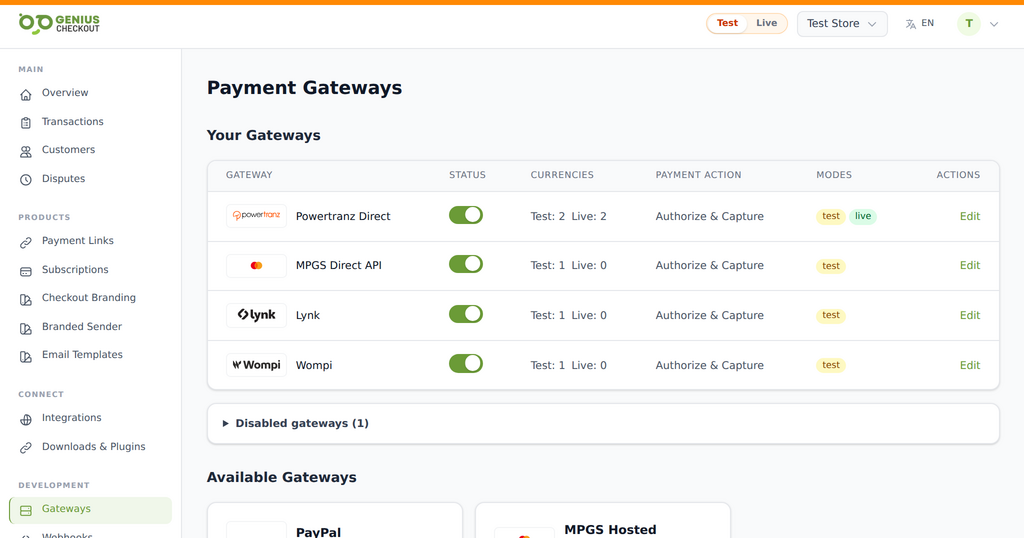 Genius Checkout keeps each approved gateway as a distinct route. The merchant activates only the services and environments provisioned for its own account.
That compatibility check protects the merchant from building against the wrong API. Azul publicly offers its own API, hosted payment page, payment links, token vault, and authentication products.
Reviewed on September 25, 2026.
Distinguish the commercial relationship from the technical gateway
The Powertranz map establishes a listed market relationship. The credential pack establishes the actual integration protocol. Ask Azul or the onboarding contact:
- Is this merchant ID processed through Powertranz/FAC or Azul's native gateway?
- Which API or hosted-page documentation applies?
- What test and production credentials will be issued?
- Which DOP and other currencies are enabled?
- What are the settlement account and currency?
- Are tokenization, recurring payments, refunds, and 3-D Secure enabled?
Do not guess from a logo or endpoint name. Genius Checkout can connect only through a supported module that matches the issued protocol.
Design a Spanish-first buyer experience
Dominican retail, hospitality, services, and tourism businesses should test Spanish labels, accented names, Dominican phone numbers, and clear DOP amounts. An international audience may also need English, but the hosted or direct gateway must receive a supported locale.
If a gateway field rejects accented characters, normalize only the transmitted field and retain the customer's correctly spelled name in the order where supported. Never substitute fabricated address values.
Where Genius Checkout adds value after compatibility is confirmed
A supported gateway profile can be brought into:
- WooCommerce for WordPress commerce.
- HighLevel for agencies, funnels, appointments, and CRM sales.
- Ecwid for an embedded store.
- Payment links and QR codes for invoices, bookings, and remote sales.
- A supported custom application through the API.
The business gets a common transaction record while each source platform keeps its order workflow.
Test the protocol actually issued
If the merchant receives Powertranz Direct credentials, follow the Genius Checkout Powertranz guide. If the merchant receives Powertranz HPP, test top-level hosted-page launch and return. If only native Azul credentials are issued, stop and use or request the appropriate Azul integration; do not relabel the credential.
For the selected route, test approval, decline, authentication, cancellation, retry, duplicate callback, refund, and any tokenized later charge. Use a new gateway order identifier for every attempt.
Preguntas para Azul o el adquirente
- ¿La integración asignada usa Powertranz/FAC o la API nativa de Azul?
- ¿Qué documentación técnica corresponde a estas credenciales?
- ¿La página de pago puede mostrarse en español e inglés?
- ¿Cuáles monedas y operaciones están habilitadas?
- ¿Se permiten tokenización y pagos recurrentes iniciados por el comercio?
Frequently asked questions
Does the Powertranz map mean Azul credentials work in the Powertranz module?
No. Confirm the actual processor and protocol. Native Azul credentials and Powertranz credentials are different unless the provider explicitly says otherwise.
Does Genius Checkout currently have a generic field for any gateway credential?
No. Gateway modules implement specific protocols and validation. Use the module that matches the provider's credential pack.
Can a Dominican merchant still use Genius Checkout payment links?
Yes when a supported and compatible gateway has been configured for the merchant.
Sources and next step
- Powertranz merchant locations
- Azul eCommerce
- Azul developer portal
- Genius Checkout Powertranz overview
- Powertranz configuration guide
Book a setup review with the issued credential pack before attempting configuration. If it is Powertranz-compatible, create a Genius Checkout account and test in the matching environment.