

On this page
To accept cards on a British Virgin Islands website, a merchant needs an approved eCommerce facility and Powertranz/FAC-compatible credentials from a participating institution. Powertranz currently shows Republic Bank and CIBC Caribbean for the BVI. Genius Checkout can then connect that approved account to a booking site, online store, CRM, payment link, or custom platform.
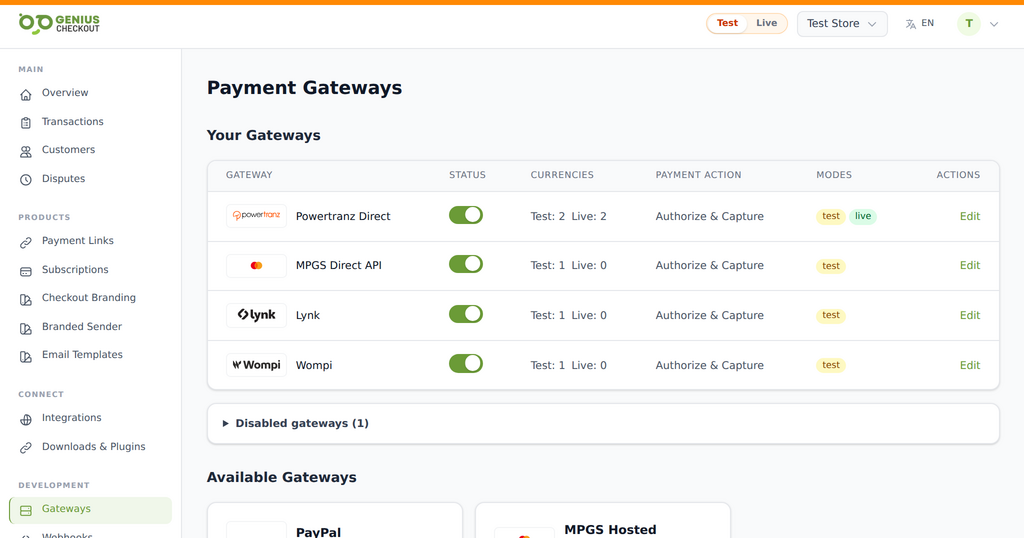 Genius Checkout keeps each approved gateway as a distinct route. The merchant activates only the services and environments provisioned for its own account.
This division of responsibility matters: the bank controls merchant approval and settlement; Powertranz processes the gateway transaction; Genius Checkout connects the gateway to the software that creates the sale.
Reviewed on September 25, 2026.
Start with the two routes shown for the BVI
| Institution | Questions for the merchant-services team |
|---|---|
| Republic Bank | Is the eCommerce profile provisioned on Powertranz/FAC, which mode is enabled, and what are the refund and settlement rules? |
| CIBC Caribbean | Which eCommerce product is approved, what credentials will be issued, and are 3-D Secure and tokenization enabled? |
Use the bank's current legal and product documents. The Powertranz map is a directory of connected institutions, not a substitute for a merchant agreement.
Charter payments need a deliberate lifecycle
The BVI's charter and villa sectors expose gaps that a simple retail checkout may hide. A charter may take a non-refundable deposit, collect a balance later, hold an authorization for extras, and return a security amount after inspection. A villa may charge in stages while using a property-management system as the source of truth.
Map each business event to a supported payment operation:
| Business event | Possible payment operation | What must be confirmed |
|---|---|---|
| Reservation deposit | Authorize & Capture | Deposit terms and immediate charge permission |
| Balance before arrival | New card-on-file payment or new payment link | Customer consent, tokenization, and unique transaction ID |
| Short operational hold | Authorize Only, then capture or void | Authorization duration and capture capability |
| Cancellation | Full or partial refund | Refund window, amount rules, and accounting treatment |
Never reuse the original gateway order ID for the balance or a retry. Each financial attempt needs its own identifier, even when all attempts point back to one reservation.
Select the gateway experience
Choose Powertranz Direct when the approved account supports the integrated Genius Checkout card flow and the business needs tokenization or future merchant-initiated charges. Choose Powertranz HPP when the approved account is designed for the provider-hosted card page.
HPP requires the exact PageSet and PageName. Direct and HPP credentials are not interchangeable. If an onboarding email uses the former FAC name, confirm the portal type rather than “correcting” a value that the provider expects.
Connect the merchant account to the operating system
After a test-mode payment works in Genius Checkout, connect the facility where the team actually manages sales:
- WooCommerce for charter products, villa deposits, merchandise, or service packages on WordPress.
- HighLevel for lead follow-up, quotations, funnels, and agency-managed campaigns.
- Ecwid for a catalogue added to an existing site.
- Payment links and QR codes for a named charter deposit or balance request.
- A custom API connection for a reservation or fleet-management system.
Buyer name, email, phone, amount, currency, and the merchant's reservation reference should travel into the payment session. The return flow should update the source booking only after the gateway result is verified server-side.
Test against operational reality
Run a deposit, a decline, and a cancellation. Use browser Back from the HPP page. Deliver the same callback twice and confirm the booking is not paid twice. If tokenization is enabled, save a card with consent and run a later low-value test transaction. Then void an uncaptured authorization or refund a captured payment according to its state.
For each test, reconcile:
- Reservation or invoice number.
- Genius Checkout transaction and receipt.
- Powertranz reference.
- Website order status.
- Institution settlement entry.
Do not record a full card number or CVV in booking notes.
Go live without crossing the environments
Test and live Merchant IDs, passwords, gateway settings, API keys, and domains must stay aligned. Configure live mode separately, run one controlled low-value payment, and verify settlement with the institution. Keep an incident contact list for the website operator, Genius Checkout, gateway support, and merchant-services team.
USD is used in the BVI, but that does not remove the need to confirm the transaction currency and settlement account on the merchant profile.
Frequently asked questions
Can a BVI company use the gateway for multiple charter brands?
Disclose every website, descriptor, and business model to the institution. Technical support for multiple domains does not expand the scope of the merchant approval.
Does Genius Checkout replace a reservation system?
No. It supplies the payment connection. The reservation system remains responsible for availability, rates, customer agreements, and fulfilment.
Can staff capture a payment later?
Only when Authorize Only and capture are enabled and staff understand the authorization window. Otherwise use Authorize & Capture or a new payment request.
Sources and next step
- Powertranz merchant locations
- CIBC Caribbean eCommerce
- Powertranz recurring payments and tokenization
- Genius Checkout Powertranz overview
- Genius Checkout Powertranz setup
Create a Genius Checkout account or book a setup review once Republic Bank or CIBC Caribbean has supplied the approved gateway details.