
On this page
- Four institutions are shown for The Bahamas
- The right setup depends on what the business sells
- Ask for a Powertranz-compatible merchant profile
- Information to collect from the bank
- Connect the account through Genius Checkout
- Test a Bahamian payment journey, not only a gateway response
- Questions Bahamian merchants commonly miss
- Sources and next step
A Bahamian business can accept card payments online by obtaining an eCommerce merchant facility from a participating local institution, receiving Powertranz or First Atlantic Commerce credentials for the approved mode, and connecting that account to its website through Genius Checkout. Powertranz's current merchant map lists Scotiabank, RBC Royal Bank, CIBC Caribbean, and Bank of The Bahamas for The Bahamas.
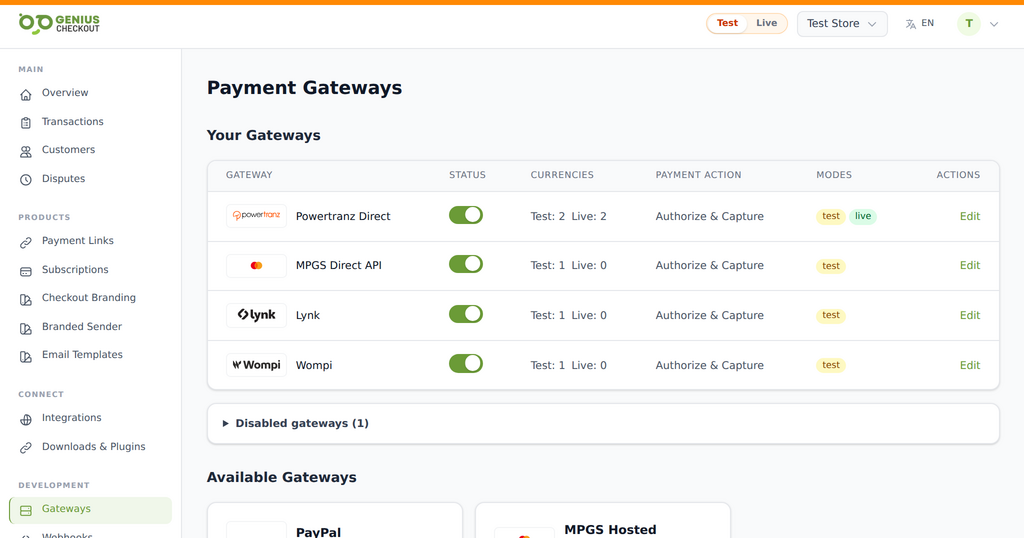 Genius Checkout keeps each approved gateway as a distinct route. The merchant activates only the services and environments provisioned for its own account.
The bank relationship comes first. Genius Checkout connects approved gateway credentials to the software where the merchant sells; it does not approve the merchant account or decide settlement terms.
Reviewed on September 25, 2026.
Four institutions are shown for The Bahamas
| Institution shown by Powertranz | What to confirm before integration |
|---|---|
| Scotiabank Bahamas | Whether the approved product is API, HPP, payment links, or another Scotia eCom+ route, and whether Powertranz-compatible credentials are supplied |
| RBC Royal Bank | Merchant ID, FAC/Powertranz mode, enabled currencies, settlement account, and recurring-payment eligibility |
| CIBC Caribbean | eCommerce product, 3-D Secure, permitted currencies, refund capability, and gateway credentials |
| Bank of The Bahamas | Current eCommerce acquiring availability, technical gateway, processing credentials, and settlement arrangement |
Powertranz is the source for this country-bank list. Product names and application availability can change, so confirm the current route with the institution. Scotiabank's public Bahamas material describes APIs, hosted payments, payment links, recurring payments, and an online-gateway support team, but only the bank can say which options it will enable for a particular merchant.
The right setup depends on what the business sells
A Nassau retailer shipping physical goods needs delivery evidence, fraud review, and a clear refund process. A resort in Exuma may collect a deposit months before arrival and charge the balance later. A charter operator may quote in USD, accept staged payments, and refund when weather interrupts service. Those are different payment operations even when the checkout button looks the same.
Before applying, document:
- What is sold and how it is delivered.
- Typical and maximum transaction values.
- Expected monthly volume and percentage of international cards.
- Whether prices appear in BSD, USD, or both.
- Deposit, cancellation, fulfilment, and refund policies.
- Whether the business needs subscriptions, card-on-file, or only one-time payments.
Do not assume that parity between BSD and USD removes settlement or currency-conversion questions. Ask which transaction currencies the merchant profile can process and which accounts can receive settlement.
Ask for a Powertranz-compatible merchant profile
The phrase “eCommerce account” is not enough for technical planning. Ask the institution whether it will issue credentials for Powertranz Direct or the Powertranz Hosted Payment Page.
Direct is the better candidate when the business requires a closely branded Genius Checkout experience, saved cards, or recurring billing and the bank has enabled tokenization. HPP sends the buyer to the secure provider page and returns the result to the website. HPP can reduce the merchant's card-form responsibilities, but the hosted page must be allowed on the merchant profile.
If the institution offers its own differently named gateway, request written confirmation that the credentials are compatible with Powertranz/FAC. A logo on the Powertranz map does not make every gateway product issued by that bank interchangeable.
Information to collect from the bank
Keep test and live details separate:
- Test Merchant ID and test processing password.
- Live Merchant ID and live processing password.
- Direct or HPP mode.
- For HPP, the PageSet, PageName, and FAC or Powertranz portal type.
- Enabled transaction and settlement currencies.
- 3-D Secure requirements.
- Authorization, capture, void, refund, and partial-refund permissions.
- Tokenization and merchant-initiated recurring-payment permissions.
- Support contacts for gateway incidents and settlement questions.
Never place those credentials in email screenshots, support chats, or source control.
Connect the account through Genius Checkout
Add the test credentials under the matching Powertranz gateway in Genius Checkout, enable only approved currencies, and test the connection. For Direct, choose Authorize & Capture when the business charges immediately, or Authorize Only only when staff have a clear later-capture process. For HPP, copy PageSet and PageName exactly.
After the gateway works, the business can use the same approved merchant configuration through:
- WooCommerce for a WordPress shop, villa site, or tour catalogue.
- HighLevel for funnels, agencies, appointment offers, and CRM workflows.
- Ecwid for an embedded online store.
- GiveWP for eligible organizations accepting donations.
- Payment links and QR codes for deposits, invoices, and WhatsApp sales.
- A supported custom application through the Genius Checkout API.
The Powertranz gateway guide identifies the source of every configuration field.
Test a Bahamian payment journey, not only a gateway response
For a resort deposit, confirm that the booking reference reaches Genius Checkout, the gateway order ID is unique, the buyer returns to the correct reservation, and the receipt states the amount and currency clearly. For a shipped item, verify that staff can reconcile the website order, Genius Checkout transaction, and bank record without using a card number.
The minimum test pack should contain an approval, decline, 3-D Secure flow, cancellation, browser Back, duplicate callback, refund, and any required authorization/capture flow. Subscription businesses must also test card saving, the first renewal, a failed renewal, and a retry with a new transaction identifier.
Questions Bahamian merchants commonly miss
Can I settle into an existing business account?
Only the institution can confirm the eligible account, currency, fees, reserves, and settlement timetable. Resolve this before quoting customers in multiple currencies.
Can one gateway serve more than one website?
Possibly, but each domain, business model, and descriptor should be disclosed and approved. Genius Checkout can organize connections, but it cannot expand the bank's approval scope.
Is a hosted page always the safest choice?
It can reduce the website's direct card-data handling, but the complete system still needs secure administration, patched software, access control, tested callbacks, and fraud procedures.
Sources and next step
- Powertranz merchant locations
- Scotiabank Bahamas eCommerce solutions
- RBC Caribbean eCommerce solutions
- CIBC Caribbean eCommerce
- Genius Checkout Powertranz overview
Create a Genius Checkout account after the institution confirms the merchant facility, or book a setup review with the onboarding pack available.